Tools & Features
Procure 101 delivers a comprehensive suite of tools built on Microsoft 365 – including Excel, Word, Forms, and Power BI. By using platforms your teams already know, we make procurement easier, faster, and more effective — without the need for complex new software.
Procure 101 in Action
Our Microsoft-based tools are designed for immediate use with customisable templates that match your organisational branding.
Live, Calculated Risk
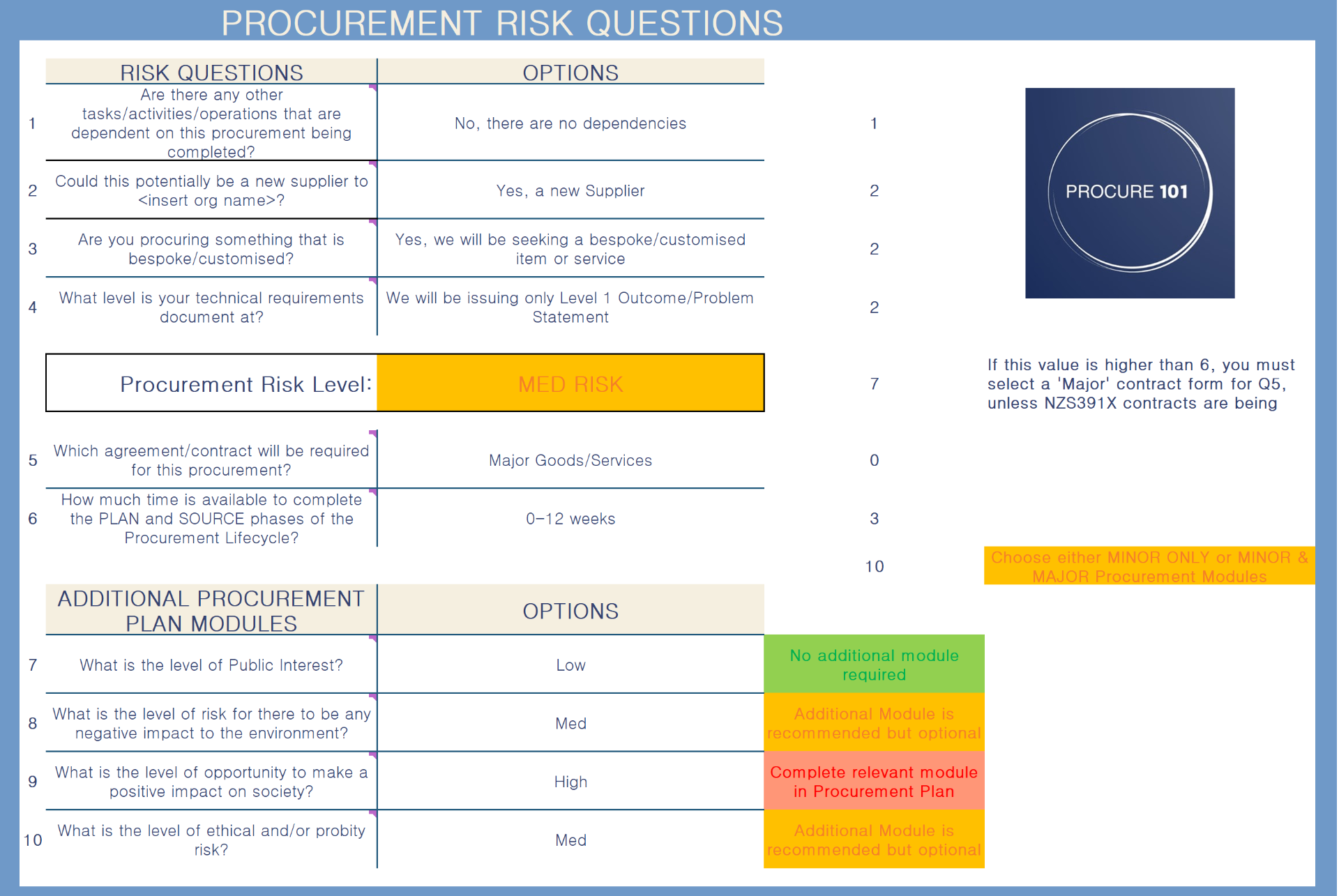
Unique to Procure 101, our procurement plan assesses the risk and automatically guides users to select the right market approach, evaluation criteria, contract form and timeline; scaling the level of planning based on the level of risk.
Selecting the Right Supplier & Solution
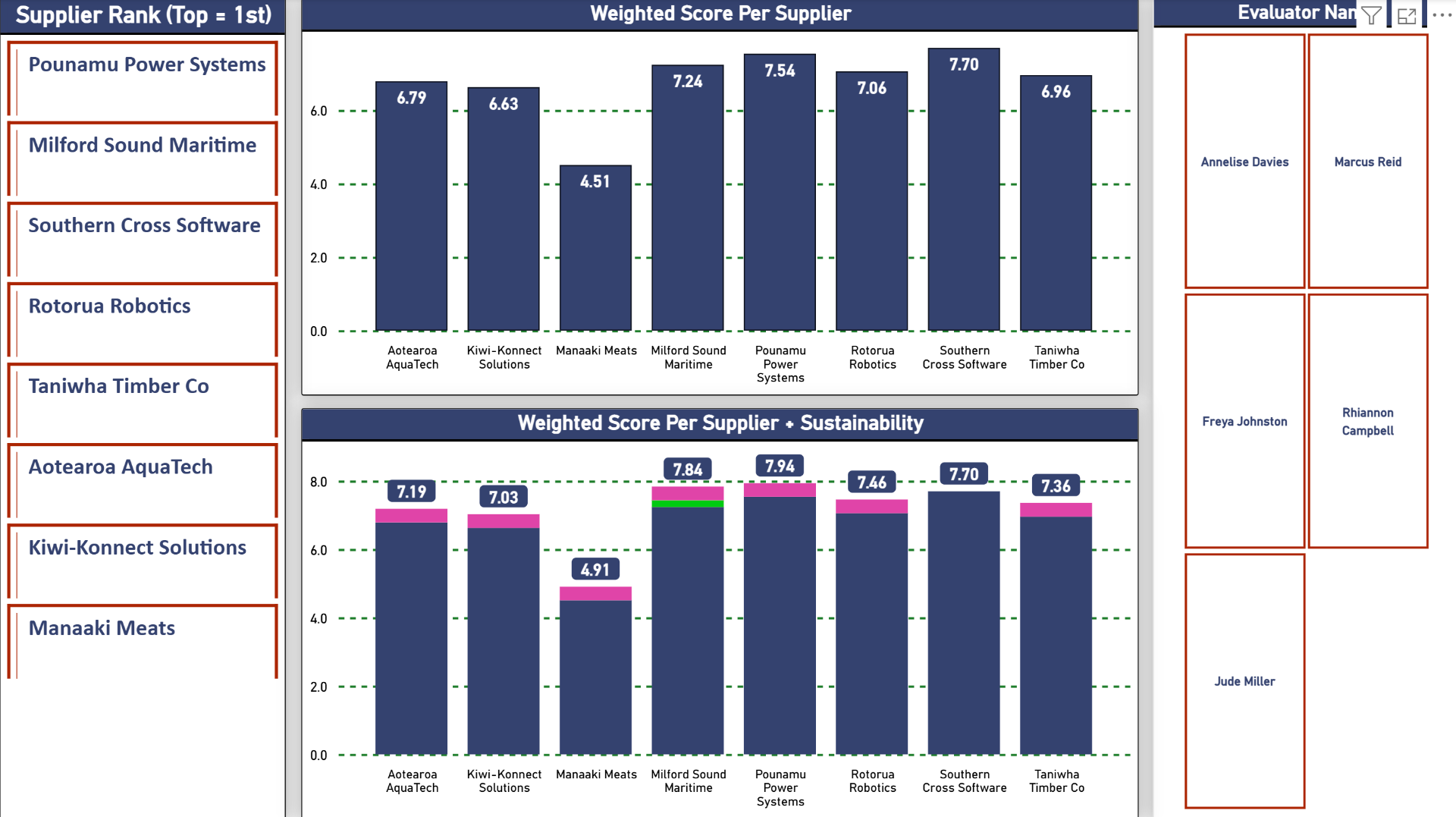
Procure 101 have combined full-proof evaluation criteria, our Q-Score® value calculation and advanced digital evaluation tools to provide evaluators with all the data points (including broader outcomes), they need to consistently make the right choices.
Saving Money, Time & Effort
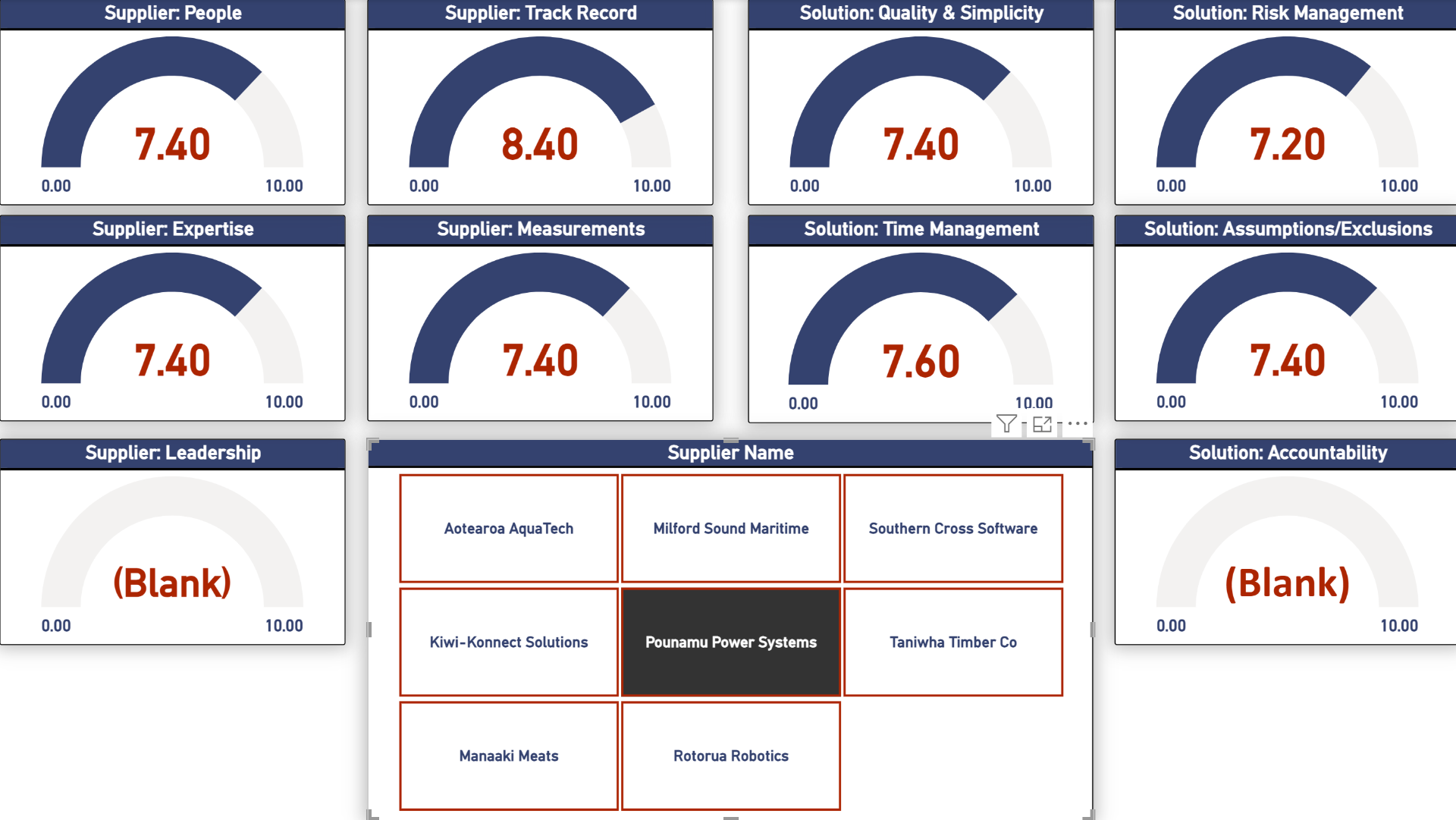
With procurement tools that finally all work together through the whole planning and sourcing phases, plus online evaluations and Procure 101's unique, live, dashboard-driven moderation sessions; endless hours are saved on procurement administration.
Complete Procurement Toolkit
From initial planning to final reporting, our unique tools cover every stage of the procurement lifecycle.
Power BI
evaluator scoring analysis and live moderation
Forms
evaluation scoring is collected via an online form
Word
simplified, guided templates for RFx/RFI/EOI, technical requirements & evaluation summary reports
Excel
new, innovative, automated procurement plan with built-in risk analysis
Your Procurement Journey
Follow our structured approach from planning to reporting — each phase supported by tools specifically designed for New Zealand government agencies.
Planning and Requirements Building
Start your procurement journey with structured planning tools
Procurement Planning
Finally, a procurement plan that is a tool to assist planning and not an administrative burden. Immediately calculate your risk level and scale your planning to match.
Key Features
- Automated risk assessment questionnaires
- Market approach recommendation engine
- Stakeholder mapping and engagement planning
- Broader outcomes prioritisation
- Evaluation criteria guidance
- Timeline management
Public Value Benefits
Technical Requirements
Don't struggle again to articulate what you want to buy, this layered and guided approach to describing your technical requirements guarantees higher quality responses from suppliers.
Key Features
- Level 1: Problem/outcome statement builder
- Level 2: Scope of work definition
- Level 3: Technical specification details
- Integrated template connecting all levels
- Market-ready articulation guide
Public Value Benefits
Engaging the Market
Focus on what suppliers want to know and engage with them effectively
Market Engagement Templates
Standardised, customisable RFx templates that provide the perfect balance of consistency and flexibility.
Key Features
- Pre-built RFx and response form templates
- Use of dropdowns to accelerate completion
- Connected to the procurement plan to allow quick copy and paste (reduce repetition of work)
- Focused and concise (no waffle)
- Clear explanation of how the supplier will be evaluated
- Ready for organisational branding integration
Public Value Benefits

Evaluation & Moderation
Always select the right supplier and solution that gives the best value for ratepayers
Supplier Evaluation & Selection
Advanced evaluation tools that significantly reduce scoring analysis and allow genuine strategic decision making.
Key Features
- Online evaluator scoring (no more spreadsheets)
- Instant scoring and value analysis
- Power BI powered visual decision making dashboards
- Dashboard bias detection
- Broader outcomes scoring integration
- Automated ranking & recommendations
Public Value Benefits

Supplier Debriefs
Provide feedback so valuable that suppliers are excited to work on the next market engagement
Supplier Debrief Sessions
Debriefs that are constructive and full of genuinely useful data that suppliers can use to improve for next time.
Key Features
- Standardised feedback templates
- Objective performance data
- Improvement recommendations
- Relationship building protocols
- Market intelligence sharing
Public Value Benefits

Why Microsoft 365?
Procure 101 tools integrate seamlessly across Excel, Word, Forms, and Power BI — leveraging the software your teams already know and trust. This means fast adoption, minimal training, and immediate value.
Fast Adoption
Your team already knows Excel, Word, and Forms — no learning curve required
Minimal Training
Familiar interfaces mean less time training, more time delivering results
Immediate Value
Start seeing improvements from day one with tools that work right away
Procurement Transformation in Action
See how a typical procurement cycle transforms from organised chaos to streamlined efficiency with Procure 101 tools.
Before: Manual Process
Planning Phase (4-6 weeks)
Email chains, Word docs scattered across teams, manual risk assessments, missed compliance requirements
Documentation (3-4 weeks)
Creating RFPs from scratch, inconsistent templates, manual formatting, version control issues
Evaluation (2-3 weeks)
Spreadsheet chaos, subjective scoring, bias creep, disputes over rankings
Reporting (1-2 weeks)
Manual data collection, late reports, limited insights, audit trail gaps
Total Time: 10-15 weeks
High risk of errors, bias, and compliance issues
After: Procure 101 Process
Planning Phase (1-2 weeks)
Guided Excel dashboard, automated risk assessment, built-in compliance checks, stakeholder mapping
Documentation (1 week)
Pre-built Word templates, automated branding, Forms integration, consistent formatting
Evaluation (3-5 days)
Weighted scoring matrices, bias detection, automated ranking, transparent decisions
Reporting (1 day)
Real-time Power BI dashboards, automated compliance reports, full audit trails
Total Time: 4-6 weeks
Reduced errors, eliminated bias, full compliance
Ready to See Procure 101 in Action?
Schedule a personalised demonstration of our tools and see how they can transform your procurement processes.